



Detailed Review
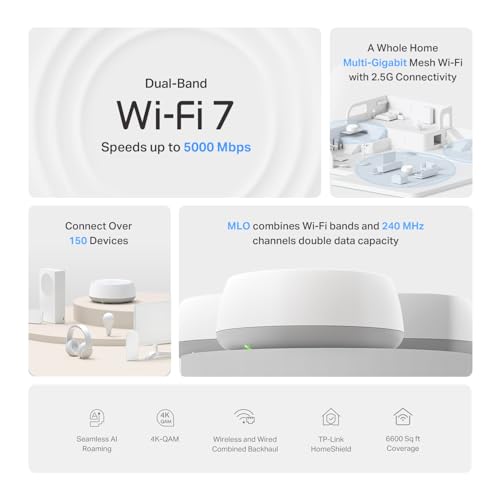
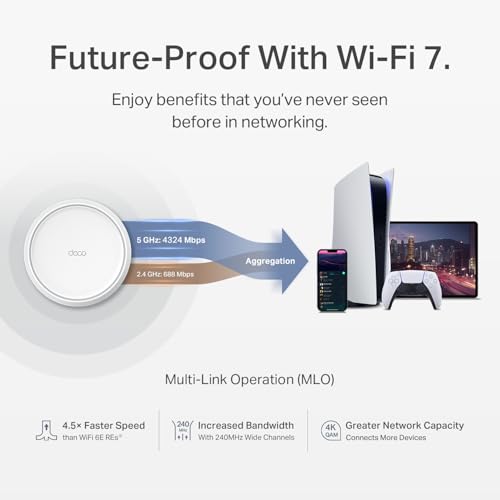
The TP-Link Deco 7 BE25 represents a significant leap forward in home networking technology with its WiFi 7 capabilities and impressive 5 Gbps total bandwidth. The system's 4-stream architecture delivers 4,324 Mbps on the 5 GHz band and 688 Mbps on 2.4 GHz, providing ample speed for demanding applications like 4K video streaming, virtual reality gaming, and heavy file transfers across multiple devices simultaneously. The three-unit pack covers up to 6,600 square feet, making it suitable for larger homes and multi-story residences where traditional single routers fall short.
What sets the Deco 7 apart is its intelligent approach to network management through AI-driven seamless roaming and dual backhaul capabilities. The AI-Roaming technology learns your movement patterns and automatically optimizes device connections as you move between rooms, eliminating the frustration of manual switching or temporary disconnections. The dual 2.5G Ethernet ports enable simultaneous wired and wireless backhaul, allowing you to choose the optimal connection method for each unit based on your home's layout and infrastructure. This flexibility ensures maximum stability and throughput for bandwidth-intensive activities.
Security and privacy are built into the foundation of this system. TP-Link's HomeShield provides free network security scanning, IoT device identification, basic parental controls, and quality of service management without requiring premium subscriptions. The inclusion of VPN client and server support means your entire network can access remote VPN servers without installing software on individual devices, adding an extra layer of privacy protection. As a CISA Secure-by-Design pledge signatory, TP-Link has designed this device with advanced security as a core requirement rather than an afterthought, giving you confidence in your network's protection.
Specifications
| Model | TP-Link Deco 7 BE25 |
| WiFi Standard | WiFi 7 (802.11be) |
| Speed (Total) | BE5000 (5 Gbps) |
| 5 GHz Band Speed | 4,324 Mbps |
| 2.4 GHz Band Speed | 688 Mbps |
| Stream Count | 4-Stream Dual-Band |
| Coverage Area | Up to 6,600 sq ft |
| Maximum Devices | 150+ devices |
| Ethernet Ports | 2x 2.5G Gigabit ports per unit |
| Backhaul | Simultaneous wired and wireless backhaul |
| Package Contents | 3-pack mesh system |
| Security Features | HomeShield, VPN client/server, network security scan, IoT identification |
| Special Features | AI-Roaming, MLO (Multi-Link Operation), CISA Secure-by-Design certified |
| App Management | TP-Link Deco App for setup and control |
| Compatibility | Backward compatible with all WiFi generations, works with any ISP |
| Requirements | Separate modem required |
Performance Guide
Real-World Speed Expectations
WiFi 7 theoretical speeds are impressive, but actual performance depends on several factors. Distance from your router, physical obstacles like walls and metal objects, and the number of connected devices all impact real-world speeds. For most users, you'll experience 1-3 Gbps depending on your location within the 6,600 sq ft coverage area. This is still significantly faster than WiFi 6 systems and more than adequate for 4K streaming, video conferencing, and gaming.
Optimal Placement Strategy
Position your main Deco unit near your modem and in a central location. Place the second unit halfway between the main unit and your furthest WiFi dead zone. The third unit can extend coverage to problem areas like basements or outdoor spaces. Avoid placing units in closets, cabinets, or near large metal objects that block signals.
Maximizing Performance
Use the 2.5G Ethernet ports to connect devices that need maximum speed, such as streaming devices, gaming consoles, or work-from-home setups. Enable wired backhaul between at least two Deco units if you have Ethernet access to multiple locations. Let the AI-Roaming feature handle device switching rather than manually managing connections. Update firmware regularly through the app to ensure optimal performance and security patches.
Setup & Security
Initial Setup Process
The Deco 7 is designed for quick deployment. Download the TP-Link Deco app, create an account, and follow the guided setup wizard. You'll name your network, set your password, and configure basic preferences within minutes. The app provides step-by-step instructions with photos, making the process accessible even for non-technical users. After initial setup, the system automatically updates firmware and optimizes performance.
HomeShield Security Features
Free security features include network security scanning that identifies vulnerabilities, IoT device identification to see what's connected to your network, basic parental controls for managing children's internet access, and quality of service settings to prioritize bandwidth for specific activities. Premium HomeShield features are available for additional protection, but the free tier provides solid baseline security for most households.
VPN Capabilities
The built-in VPN support allows your entire network to route through a VPN server without configuring each device individually. This is particularly useful for protecting smart home devices that don't support VPN apps. You can simultaneously use VPN and regular internet connections, allowing some devices to access remote resources securely while others use standard connections.
Key Features
- Ultra-fast WiFi 7 speeds up to 5 Gbps for seamless 4K/8K streaming and gaming
- Covers up to 6,600 sq ft with support for 150+ devices in a single network
- AI-powered roaming technology automatically optimizes connections as you move throughout your home
- Dual 2.5G Ethernet ports enable wired and wireless backhaul for maximum stability
- Built-in HomeShield security with network protection and parental controls included free
- VPN client and server support for enhanced privacy across all home devices
- CISA Secure-by-Design certified with advanced security as a core requirement