




Detailed Review
The Canon PIXMA TS4320 delivers impressive value for budget-conscious households and small home offices. This compact all-in-one printer excels at producing crisp, vibrant documents and photos through its hybrid 2-cartridge ink system, which balances print quality with cost efficiency. The wireless connectivity works smoothly across both 2.4GHz and 5GHz bands, allowing you to print from your smartphone, tablet, or computer without fumbling with cables.
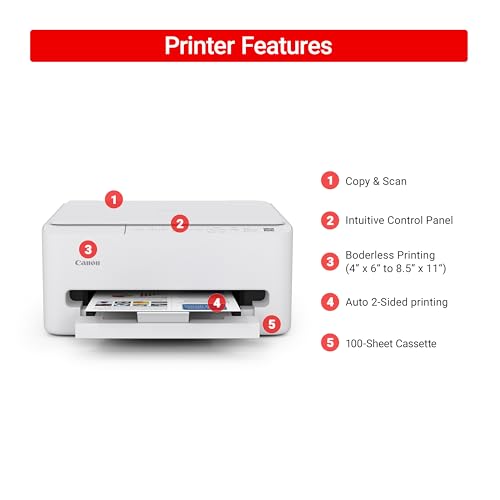
What sets this printer apart is its practical feature set for everyday users. Automatic two-sided printing saves both paper and time, while the integrated scanner and copier handle basic document management tasks. Mobile printing integration through Canon PRINT App, Apple AirPrint, and Mopria Print Service means you can print directly from your device with minimal setup hassle. The compact design makes it a smart choice for tight spaces, and its EPEAT Silver and ENERGY STAR certifications appeal to environmentally conscious buyers looking to reduce their carbon footprint.
This printer shines for light to moderate home use, but potential buyers should know it lacks an automatic document feeder and has modest paper capacity. If your printing needs are occasional and space is at a premium, the TS4320 offers reliable performance and solid build quality. It's an excellent entry point for hybrid workers who need printing flexibility without the premium price tag.
Specifications
| Brand | Canon |
| Model | PIXMA TS4320 |
| Printer Type | All-in-One Inkjet (Print, Scan, Copy) |
| Print Technology | 2-Cartridge Hybrid Ink System |
| Connectivity | Dual-Band Wi-Fi (2.4GHz / 5GHz), USB |
| Mobile Printing | Canon PRINT App, Apple AirPrint, Mopria Print Service |
| Maximum Media Size | 8.5" x 11" |
| Automatic 2-Sided Printing | Yes |
| Design | Compact, White |
| Environmental Certifications | EPEAT Silver, ENERGY STAR Certified |
| Warranty | 1 Year Limited Warranty |
Best For
Ideal Users:
- Home office professionals and hybrid workers needing occasional printing
- Budget-conscious families seeking multifunction capabilities
- Small spaces where a full-size printer won't fit
- Eco-minded users prioritizing energy efficiency
- Anyone wanting simple, wireless printing without complex setup
Not Ideal For:
- High-volume printing environments requiring fast output speeds
- Offices needing automatic document feeding for batch processing
- Users requiring specialized photo printing or large format support
Setup & Connectivity
Getting Started: The Canon PIXMA TS4320 emphasizes user-friendly setup. Simply unbox, load paper and ink cartridges, and connect via Wi-Fi. The intuitive interface guides you through initial configuration without requiring technical expertise.
Wireless Performance: Dual-band Wi-Fi (2.4GHz and 5GHz) provides flexibility and stable connections throughout your home or office. The 5GHz band offers faster speeds for larger file transfers, while 2.4GHz extends range for devices further from your router.
Mobile Printing Options: Print directly from smartphones and tablets using Canon PRINT App, Apple AirPrint (iOS devices), or Mopria Print Service (Android). This flexibility means you can print documents, photos, and emails without connecting to a computer.
Network Requirements: A functioning Wi-Fi network is essential for wireless printing. USB connection is available as an alternative if Wi-Fi isn't available.
Key Features
- Budget-friendly all-in-one functionality for printing, scanning, and copying
- Dual-band Wi-Fi connectivity for seamless printing from smartphones and tablets
- Automatic two-sided printing reduces paper waste and printing time
- Compact design fits easily into small home office spaces
- Mobile printing support via Canon PRINT App, Apple AirPrint, and Mopria
- EPEAT Silver and ENERGY STAR certified for eco-conscious users
- Sharp text and vibrant color output with hybrid 2-cartridge ink system