



Detailed Review
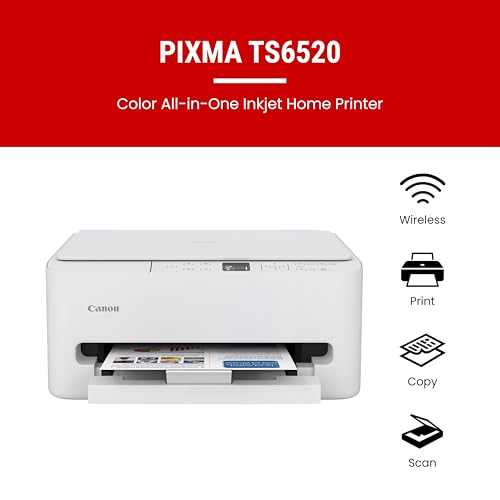
The Canon PIXMA TS6520 stands out as a practical all-in-one solution for home users and hybrid workers seeking affordability without sacrificing core functionality. Its 2-cartridge hybrid ink system delivers sharp, professional-quality text documents alongside vibrant color photos, making it equally capable for both everyday printing needs and creative projects. The compact footprint ensures this printer integrates seamlessly into tight workspaces, while the intuitive 1.42-inch OLED display provides quick access to ink levels and printer status.
Wireless connectivity is a strong point, with dual-band Wi-Fi support (2.4GHz and 5GHz) ensuring stable, consistent performance throughout your home or office. Mobile printing capabilities through the Canon PRINT App, Apple AirPrint, and Mopria Print Service eliminate the need to transfer files to a computer first, streamlining your workflow. Automatic 2-sided printing is another practical feature that reduces paper consumption and accelerates multi-page jobs, making this device both eco-conscious and time-efficient.
Where the TS6520 excels is in delivering genuine value at its price point. It covers the essential functions most home offices require: printing, scanning, and copying. The setup process is straightforward for both computers and smartphones, so you can start printing within minutes. If your needs are basic to moderate and you prioritize reliability and simplicity over advanced features, this Canon printer offers dependable performance that justifies its budget-friendly positioning.
Specifications
| Feature | Details |
|---|---|
| Brand | Canon |
| Model | PIXMA TS6520 |
| Printer Type | Wireless Color Inkjet All-in-One |
| Functions | Print, Scan, Copy |
| Ink System | 2-Cartridge Hybrid |
| Print Quality | Sharp text and vibrant colors |
| Media Support | Up to 8.5 x 11 inches |
| Duplex Printing | Automatic 2-sided printing |
| Display | 1.42-inch Monochrome OLED |
| Connectivity | Dual-band Wi-Fi (2.4GHz and 5GHz) |
| Mobile Printing | Canon PRINT App, Apple AirPrint, Mopria Print Service |
| Color | White |
| Design | Compact and space-saving |
Buyer's Guide
Is This Printer Right for You?
The Canon PIXMA TS6520 is an excellent choice if you need a reliable, affordable all-in-one printer for home or hybrid work. Consider this model if you: print documents and photos regularly, want wireless printing from multiple devices, have limited desk space, and prefer simplicity over advanced features. It's particularly well-suited for students, freelancers, small home offices, and families managing household printing tasks.
Who Should Look Elsewhere: If you require large-format printing, high-volume professional output, or advanced features like automatic document feeders, you may want to explore higher-end models. Similarly, if color preview on your printer's display is important for your workflow, the monochrome OLED screen may feel limiting.
Setup and Support: Canon provides straightforward setup guides for both computer and mobile connections. The dual-band Wi-Fi ensures compatibility with most home networks, and the PRINT App simplifies remote printing. Customer support is readily available through Canon's website and community forums.
Performance & Reliability
Print Quality and Speed
The 2-cartridge hybrid ink system balances cost-efficiency with output quality. Documents emerge with crisp, legible text suitable for professional correspondence, while photos display vibrant colors and good detail. Print speed is respectable for a budget model, and the automatic duplex feature accelerates multi-page jobs while reducing paper waste.
Wireless Performance
Dual-band Wi-Fi connectivity provides flexibility and stability. The 5GHz band offers faster data transfer when you're close to the router, while the 2.4GHz band extends range for printing from other rooms. Connection drops are rare, and reconnection is seamless when devices return to range.
Scanner and Copier Functions
The integrated scanner handles everyday copying and document digitization efficiently. While not the fastest scanner on the market, it delivers adequate performance for home office needs. The copy function produces clear reproductions suitable for most household and small business purposes.
Key Features
- Print, scan, and copy in one compact device that fits any workspace
- Dual-band Wi-Fi ensures stable printing from phones, tablets, and computers
- Automatic 2-sided printing saves paper and reduces printing time
- 2-cartridge hybrid ink system produces crisp text and vivid color photos
- Mobile printing via Canon PRINT App, Apple AirPrint, and Mopria Print Service
- 1.42-inch OLED display shows ink levels and printer status at a glance
- Affordable price point delivers exceptional value for home and hybrid workers